





|
VRay.com - Your source for all things V-Ray
:: V-Ray for 3ds Max / Design
Product information and resources on this page are copyright of Chaos
Software Ltd. V-Ray is a trademark of Chaos Software Ltd. The official source of
information on V-Ray is chaosgroup.com. This site is not affiliated with
www.chaosgroup.com.
V-Ray for 3ds Max / Design
| V-Ray for 3ds Max / Design ( Quick Select ) |
|
VRay for 3ds Max Plug-ins
VRay for 3ds Max Professional Training
|
|
| An update to V-Ray 2.0 for 3ds Max is now available! |
|

Rendering by PSA
An update to V-Ray 2.0 for 3ds Max is now available and delivers outstanding new features
and improvements, including enhanced GPU functionality using V-RayRT and new
Hair and Fur capabilities.
New Hair and Fur Capabilities
- Render hair and fur with unprecedented quality, control, and speed using
the new VRayHairMtl shader and VRayHairInfoTex map.
- Seamlessly render hair created using Ephere’s Ornatrix plug-in with the
new modifier - VRayOrnatrixMod.
 |
V-Ray 2.0 Hair and Fur Shader Tutorial
by Dimitar Krastev-Jimmy, Chaos Group |
Real-time Rendering Improvements
- Incorporate VRayProxy objects, texture-mapped area and mesh lights,
Simple Skylight portals, and the VRayBlendMtl into an ultra-fast V-RayRT GPU
workflow.
- Pan and zoom within V-RayRT’s ActiveShade window using "Real Zoom."
Next-Generation Texturing
- Experience the benefits of Ptex, an innovative texturing method
eliminating the need to assign UVs, using the new VRayPTex map. (Ptex is
created by Walt Disney Animation Studios®)
V-Ray Frame Buffer Enhancements
- Load ICC profiles directly into the V-Ray Frame Buffer to ensure
consistent color.
- Access to the V-Ray frame buffer from MaxScript.
- Right-click to access a new menu with important VFB features.
MetaSL Support
- Load textures and materials created in the meta shading language, MetaSL,
using the new VRayGSLTex map and VRayGLSLMtl shader.
Click here for more information
|
|
| V-Ray 2.0 for 3ds Max / Design |
|


Image by Mackevision

Image by Swiss Interactive AG
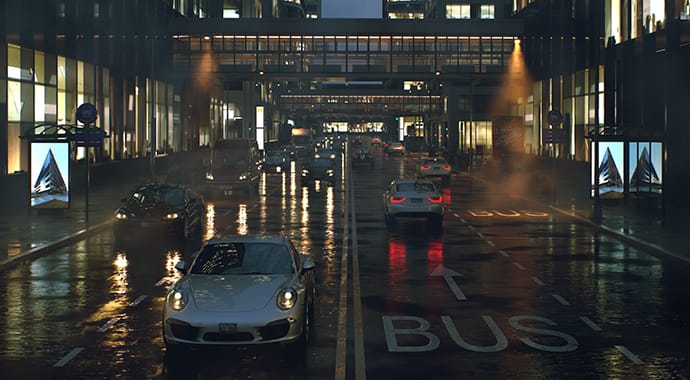
V-Ray has become the top choice for fast and accurate photo-realistic rendering. Offering state-of-the-art rendering technology, V-Ray has single handedly transformed the CG industry.

Image by Blur Studio

Image by Blur Studio
Click here for more information
Also Available:
V-Ray 2.0 for 3ds Max Upgrade
|
|
| V-Ray Newsletter |
|

Renderings by Dennis Brunn |
|
Subscribe to our V-Ray Newsletter
Subscribe to our V-Ray Newsletter and receive new V-Ray product
announcements, special sales, tutorial updates and more!
 |
|
Your email address is never shared and is
always kept strictly confidential. Each newsletter that we send always
has a single click unsubscribe link so that you can unsubscribe at any
time if you decide that you wish to do so. |
|
|
|
| The Third & the Seventh - Film by Alex Roman |
|
The Third & the Seventh
| |
| |
| Rendered with V-Ray for 3ds Max |
| |
|
|
Architecture through the cinematographic lens. The visual fusion between the
third and the seventh arts.
The Third & the Seventh is a full CG animated piece that illustrates
architecture art across a photographic point of view where the main subjects are
already built spaces.
|
|
| Buy V-Ray for 3ds Max / Design |
 |
|
Buy V-Ray for 3ds Max / Design
(New 2.0)
V-Ray has become the top choice for fast and accurate photo-realistic
rendering. Offering state-of-the-art rendering technology, V-Ray has single
handedly transformed the CG industry.
View
Product Page |
 |
|
Buy V-Ray for 3ds Max / Design (EDU)
The educational edition of V-Ray for 3ds Max provides Universities and
training centers a substantial discount with 10, 20 and 30 license
bundles.
View
Product Page |
|
|
| Buy MultiScatter |
 |
|
Buy MultiScatter
MultiScatter is a plug-in for 3ds max which works with V-Ray and
Mental Ray rendering systems. It is possible to create complicated scenes
with a huge amount of objects easy and quickly with the aid of this plug-in.
Now includes MultiPainter!
View Product Page |
|
|
| Buy AutoGrass for V-Ray |
 |
|
Buy AutoGrass for V-Ray
Autograss is your one-click grass solution for V-Ray
Select your object, click AutoGrass, and you're done. You've got photorealistic grass that renders in V-Ray for 3ds Max.
View Product Page |
|
|
| V-Ray for 3ds Max Professional Training |
 |
|
Archinteriors Vol. 16 Learn to create photo-realistic architectural interiors in V-Ray for 3ds Max with Evermotion's incredible "learn-by-example" Archinteriors Vol. 16. This DVD contains 10 top-quality ready to be rendered scenes, each with professionally designed 3D models and materials. Simply load a scene and render! Get a "behind the scenes" look at what it takes to create professional and commercially viable architectural interiors within V-Ray for 3ds Max.
Click here for more information
|
|
|
| V-Ray for 3ds Max Manual |
 |
|
V-Ray for 3ds Max / Design Manual
Learn V-Ray with the official manual. This manual provides extensive information on all aspects of the V-Ray rendering system.
Read More... |
|
|
| Featured V-Ray for 3ds Max Tutorial |
 |
|
Photon Mapping In this tutorial we'll examine photon mapping in V-Ray and efficient ways to use it.
What is photon mapping?
Photon mapping is a technique for computing global illumination. However, in difference from the irradiance map, which starts tracing rays from the camera, photon mapping traces rays from the lights in the scene. The two approaches are not mutually exclusive, and indeed for best results the photon map and the irradiance map should be used together.
The photon map has many parameters that allow for a lot of interesting results; here we will not discuss all possibilities but will just point out settings that are reliable and work well in most cases.
Read More...
|
|
|
| Featured V-Ray for 3ds Max Gallery Image |
|
Featured V-Ray for 3ds Max / Design Gallery Image

Image by Michael Seidl
View
more images
|
|
| V-Ray for 3ds Max / Design ( Quick Select ) |
|
VRay for 3ds Max Plug-ins
VRay for 3ds Max Professional Training
|
|
|
|